What Is Web Hosting? Complete Guide for Beginners
So you just bought a domain name, and now some website is asking you to pick a “hosting plan.” Cue the panic. You Google “What Is Web Hosting” at 11 p.m., hoping for a straight answer instead of a wall of tech jargon. Sound familiar? You’re definitely not the only one who’s been there.
Good news: you’re about to get the plain-English version, no computer science degree required. This post breaks down exactly what web hosting does, why your website needs it, and how to pick one without losing your mind. By the end, you’ll actually get it—and maybe even feel a little confident making your choice.
What Is Web Hosting?
Picture your website as a house. Every house needs land to sit on, and that’s exactly what a web hosting service provides for your site. It’s a rented space on a powerful computer, called a server, where all your website files live around the clock. Without that space, your images, text, and code have nowhere to exist online.
A hosting provider owns and maintains these servers so you don’t have to. Your website files, from HTML documents to product photos, sit on server resources that stay connected to the internet 24/7. When someone types your web address into a browser, that request travels to your server and pulls up your site instantly. It’s less complicated than it sounds, honestly.
Why Do You Need Web Hosting?
Here’s the blunt truth: no hosting means no website. You can design the most beautiful homepage in the world, but without a server to store it, nobody will ever see it. Hosting isn’t optional; it’s the foundation everything else gets built on.
Beyond just “existing online,” a good host shapes how your site performs day to day. Speed, security, and reliability all trace back to the quality of your hosting plan. Cheap out here, and you’ll feel it later through slow load times or unexpected outages.
Store Your Website Files
Every image, script, and page you’ve built needs somewhere to sit. Your host provides that storage, keeping your website data organized and ready to serve. Think of it as a digital filing cabinet that never sleeps. Without it, your carefully coded site is just sitting on your laptop, going nowhere.
Make Your Website Accessible Online
Hosting connects your files to the wider internet. Once your site is live on a server, anyone with a browser and an internet connection can find it. That’s the whole point of building a website in the first place, isn’t it? No hosting, no audience.
Improve Website Speed and Performance
Slow websites lose visitors fast, often within a few seconds. Quality hosting affects website performance directly through better hardware and smarter configurations. A host running on solid server infrastructure loads pages more quickly than one packed with too many sites. Speed isn’t a luxury; it’s survival online.
Keep Your Website Secure
Threats like malware and hacking attempts never really stop. A dependable host builds in security features, including firewalls and regular monitoring, to catch problems early. This protects both your data and your visitors’ trust. Skimping on security here can cost you far more later.
Ensure Better Uptime and Reliability
Nothing frustrates visitors like a site that won’t load. Reliable hosts guarantee strong website uptime, often above 99.9%, so your business stays reachable. Downtime doesn’t just annoy people; it costs sales and damages your reputation. Reliability, in short, is money in the bank.
How Does Web Hosting Work?
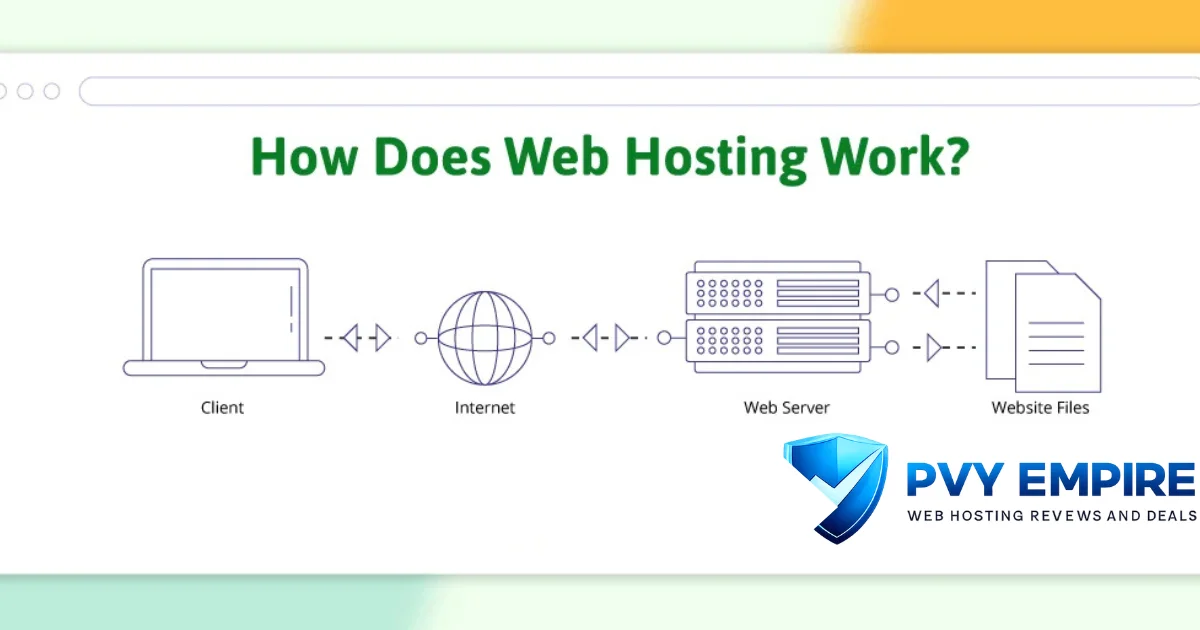
Web hosting sounds technical, but the mechanics behind it are surprisingly straightforward once you break them down. Your files sit on a server, and that server waits patiently for visitors to request them. Every click, every page load, follows the same basic pattern behind the scenes.
Understanding this process helps you make smarter decisions later, especially when comparing plans or troubleshooting issues. You don’t need to become a network engineer. You just need the gist of what’s happening when someone visits your site.
What Happens When Someone Visits Your Website?
A visitor types your URL, and their browser sends a request out to the internet. That browser request travels through the Domain Name System, which translates your domain name into an IP address. The matching server receives the request and sends back your website’s files. Your visitor sees a fully loaded page within seconds, often without realizing all this happened.
Web Server Explained
A web server is simply a powerful computer built to store and deliver website files. Unlike your home laptop, it’s designed for constant uptime and heavy traffic. It listens for incoming requests and responds with the right data every time. Hosting providers run thousands of these machines inside massive data centers.
Why Using a Web Hosting Provider Is Easier Than Running Your Own Server
Technically, you could buy your own server and run it from your garage. Realistically? That’s a nightmare involving cooling systems, backup power, and constant maintenance. A hosting provider handles all of that complexity for a monthly fee. It’s cheaper, safer, and honestly, a lot less stressful than DIY server management.
What Is the Difference Between Web Hosting and a Domain Name?
People mix these two up constantly, and honestly, it’s an easy mistake to make. Web hosting and a domain name work closely together, but they’re not the same product at all. Confusing them leads to headaches when setting up a new site.
Think of it this way: the domain is your address, and hosting is the actual building at that address. You need both pieces for a functioning website. Buying one without the other leaves you with half a solution.
What Is a Domain Name?
Your domain name is the readable web address people type into their browser, like example.com. It replaces a long, hard-to-remember IP address with something memorable. You register it through a domain registrar, usually paying an annual fee. It doesn’t store any files; it just points visitors in the right direction.
How Domain and Hosting Work Together
Once you own a domain, you point it toward your hosting account using nameservers. This connection tells the internet exactly where to find your website files. Without that link, your domain leads nowhere, and your hosting sits unused. Together, they form the complete package your site needs to go live.
What Are the Main Types of Web Hosting?
Not every website needs the same setup, which is why hosting comes in several flavors. Choosing the right type depends on your traffic, budget, and technical comfort level. Get this decision right, and everything downstream becomes easier.
Below, we’ll break down the five most common options. Each one trades off cost, control, and performance differently, so weigh them against your actual needs rather than picking whatever sounds fanciest.
Shared Hosting
Shared hosting puts multiple websites on a single shared server, splitting resources among everyone. It’s the entry-level option most beginners start with.
Pros:
- Extremely affordable, often under $5 a month
- Beginner-friendly setup with minimal technical knowledge required
- Maintenance handled entirely by the provider
Cons:
- Performance can dip during another site’s traffic spike
- Limited customization and root access
- Fewer resources overall
Best For: Personal blogs, small portfolios, and first-time website owners testing the waters.
VPS Hosting
VPS hosting, short for virtual private server, divides one physical machine into isolated virtual sections. Each site gets guaranteed resources instead of sharing unpredictably.
Pros:
- More consistent performance than shared plans
- Greater customization and often full root access
- Scales well as traffic grows
Cons:
- Costs more than shared hosting
- Requires some technical know-how
- Still shares physical hardware with other VPS instances
Best For: Growing websites that have outgrown shared hosting but aren’t ready for a dedicated server.
Cloud Hosting
Cloud hosting spreads your website across a network of connected servers rather than relying on just one. If a single machine fails, another picks up the slack instantly.
Pros:
- Excellent reliability through redundancy
- Handles sudden traffic surges gracefully
- Flexible, pay-as-you-go pricing models
Cons:
- Pricing can become unpredictable with heavy usage
- Slightly steeper learning curve for configuration
- Not always beginner-friendly out of the box
Best For: Businesses expecting variable or rapidly growing traffic, including ecommerce during sales events.
WordPress Hosting
This option is fine-tuned specifically for sites built on WordPress, the world’s most popular content management system. Providers pre-configure servers for speed and compatibility with WordPress’s quirks.
Pros:
- Optimized speed for WordPress-specific workloads
- Often includes automatic updates and backups
- Simplified, beginner-friendly dashboards
Cons:
- Locked into the WordPress ecosystem
- Slightly pricier than generic shared plans
- Less useful if you’re not using WordPress at all
Best For: Bloggers, small businesses, and anyone building specifically on WordPress.
Dedicated Hosting
With dedicated hosting, you rent an entire physical server exclusively for your website. No sharing, no compromises, just raw power at your disposal.
Pros:
- Maximum performance and full control
- Complete customization of server configuration
- No competition for resources from other sites
Cons:
- Expensive, often starting around $80 to $300+ monthly
- Requires technical expertise to manage
- Overkill for smaller websites
Best For: High-traffic enterprise websites, large online stores, or platforms handling sensitive data.
What Features Should You Look for in a Web Hosting Service?
Comparing hosting plans can feel overwhelming once you notice how many features get listed. Not all of them matter equally, though. Focusing on the essentials saves you from paying for extras you’ll never actually use.
Here’s what genuinely moves the needle for most website owners, broken down feature by feature so you know exactly what to check before signing up.
SSD or NVMe Storage
SSD storage and the newer NVMe storage read and write data far faster than older spinning hard drives. This translates directly into quicker page loads for your visitors. NVMe pushes performance even further than standard SSDs. If speed matters to you, and it should, prioritize hosts offering these upgrades.
Bandwidth
Bandwidth measures how much data your site can transfer to visitors within a given period. Low bandwidth caps can throttle your site during traffic spikes. Many modern hosts now offer unmetered or generous monthly bandwidth allowances. Always check whether “unlimited” claims come with hidden fine print.
Free SSL Certificate
An SSL certificate encrypts data between your server and your visitors’ browsers, enabling that reassuring padlock icon. Most reputable hosts now include a free SSL certificate with every plan. This isn’t optional anymore; search engines penalize sites without HTTPS. Double-check it’s included before assuming.
Free Domain
Some hosting plans throw in a free domain for the first year as a signup incentive. It’s a nice bonus, but read the renewal terms carefully. Prices often jump significantly after that initial period. Don’t let a free domain be your only reason for choosing a provider.
Email Hosting
Email hosting lets you create professional addresses like [email protected] instead of relying on generic providers. Many plans bundle this in at no extra charge. It adds credibility, especially for small businesses. Check inbox limits and storage caps before assuming it’s unlimited.
Backups
Automatic website backup systems save you from disaster when something breaks or gets hacked. Look for daily or weekly backup schedules with easy one-click restoration. Manual-only backup options mean more work falls on you. This feature alone can save your entire website someday.
Security Features
Beyond SSL, look for DDoS protection, malware scanning, and firewall configurations. These security features shield your site from increasingly common cyberattacks. A breach can cost far more than the hosting plan itself in lost trust and revenue. Never treat security as an afterthought.
Control Panel
A control panel, like cPanel or hPanel, gives you a visual dashboard for managing your hosting account. It simplifies tasks like installing software or checking resource usage. Beginners especially benefit from an intuitive hosting dashboard. Clunky control panels create unnecessary frustration down the line.
One-Click WordPress Installation
If you’re building on WordPress, one-click installation saves serious setup time. Instead of manual configuration, you click a button, and your CMS installs automatically. Most modern hosts include this as a standard feature now. It’s a small convenience that makes a real difference for beginners.
Customer Support
Things break, servers hiccup, and questions come up at odd hours. Strong customer support, ideally through 24/7 live chat, phone, or tickets, matters more than people expect. Test response times before committing if possible. A host with excellent features but poor support can still leave you stranded.
Uptime Guarantee
An uptime guarantee promises your site stays accessible a certain percentage of the time, typically 99.9% or higher. Anything lower signals potential reliability issues. Some providers even offer credits if they fail to meet this promise. Always verify this claim through independent reviews, not just marketing pages.
How to Choose the Right Web Hosting Provider?
With so many options flooding the market, picking a provider can feel like guesswork. It doesn’t have to be, though. Narrowing your decision down to a handful of factors makes the process manageable and far less overwhelming.
Run through this checklist before committing to any plan. Skipping steps here often leads to regret, or worse, a painful mid-project migration later.
Website Type
A personal blog and a booming online store have wildly different hosting needs. Match your plan to your actual use case rather than following generic advice. An e-commerce website demands more resources than a simple personal website. Know your project before you shop.
Performance
Check load time benchmarks and server locations before signing up. Website performance directly impacts both user experience and search rankings. Providers with data centers near your target audience typically perform better. Don’t ignore this just because pricing looks attractive.
Security
Verify what security features come standard versus what costs extra. Malware scanning, firewalls, and DDoS protection shouldn’t be premium add-ons for basic protection. Ask specifically what happens if your site does get compromised. A vague answer here is a red flag.
Scalability
Your hosting needs today won’t match your needs in two years, hopefully because you’ve grown. Choose a provider offering easy upgrades between plans. Website scalability prevents painful migrations down the road. Growing pains shouldn’t mean starting from scratch elsewhere.
Pricing
Compare hosting costs across the full contract term, not just the flashy first-month price. Many providers advertise low introductory rates that balloon at renewal. Factor in what you’re actually getting for that price, too. Cheapest isn’t always best; sometimes it’s just cheapest.
Customer Reviews
Independent reviews reveal patterns marketing pages conveniently leave out. Search for consistent complaints about downtime, support quality, or billing surprises. One bad review means little; a pattern across dozens means something. Trust the crowd over the sales copy.
Money-Back Guarantee
A solid money-back guarantee, typically 30 days or more, lets you test-drive a host risk-free. If they won’t offer one, ask yourself why. This safety net matters especially for first-time buyers unsure what they actually need. It’s a small detail that says a lot about provider confidence.
How Much Does Web Hosting Cost?
Pricing varies wildly depending on hosting type, provider reputation, and included features. There’s no single “normal” price here. Understanding the general ranges helps you spot a fair deal versus an overpriced one immediately.
Keep in mind that renewal pricing often differs sharply from introductory offers. Always check both numbers before you commit to anything long-term.
| Hosting Type | Typical Monthly Range |
| Shared Hosting | $2 – $10 |
| VPS Hosting | $10 – $100 |
| Cloud Hosting | $10 – $150+ (usage-based) |
| Dedicated Hosting | $80 – $300+ |
Shared Hosting Pricing
Shared plans stay the cheapest, typically ranging from $2 to $10 monthly. Introductory pricing often looks even lower for the first term. Renewal rates can double or triple afterward, though. Budget accordingly rather than getting blindsided later.
VPS Pricing
VPS plans run from roughly $10 to $100 per month, scaling with allocated resources. More CPU, RAM, and storage push the price upward accordingly. It sits comfortably between shared and dedicated in both cost and performance. Choose based on your actual traffic projections.
Cloud Hosting Pricing
Cloud hosting often uses usage-based, pay-as-you-go pricing instead of flat monthly rates. Costs can range from $10 for light usage to well over $150 for heavy traffic. This flexibility helps during quiet months but requires monitoring during spikes. Set billing alerts to avoid surprises.
Dedicated Hosting Pricing
Dedicated servers command premium pricing, generally $80 to $300 or more monthly. You’re paying for exclusive access to serious hardware. This tier suits businesses where downtime or shared resources simply aren’t acceptable. It’s an investment, not a starter plan.
Can You Host a Website for Free?
Yes, technically, free hosting exists and plenty of beginners start there. It comes with real trade-offs, though, and those trade-offs matter more than people initially realize. Free rarely means “no cost” in the bigger picture.
Before choosing this route, weigh what you’re gaining against what you’re giving up. Sometimes it’s a smart starting point; other times it’s a costly detour.
Advantages
Free hosting eliminates upfront costs, which appeals to hobbyists and testers. It’s a low-risk way to learn website basics without financial commitment. Setup is usually quick and beginner-friendly. For a simple experiment, it can genuinely make sense.
Limitations
Free plans typically cap server resources, limit storage, and often display ads you can’t remove. Performance and website uptime suffer compared to paid alternatives. Support is minimal or nonexistent when things go wrong. You also rarely get a custom domain included.
When Free Hosting Makes Sense
Free hosting fits temporary projects, personal experiments, or portfolio tests with zero budget. It’s not suitable for businesses or anything generating real traffic or revenue. Once your site starts mattering to you, upgrade quickly. Treat it as training wheels, not a permanent home.
Common Web Hosting Terms Beginners Should Know
Hosting comes loaded with jargon that sounds more intimidating than it actually is. Once you know the basics, provider comparisons become far easier to navigate. This glossary covers the terms you’ll bump into constantly.
Bookmark this section; you’ll likely reference it again while shopping for plans or troubleshooting issues later.
Server
A server is a specialized computer that stores and delivers website files to visitors upon request. It runs continuously, unlike a typical home computer. Hosting providers manage massive fleets of these machines. Everything about hosting ultimately traces back to this piece of hardware.
DNS
DNS, or Domain Name System, translates human-readable domain names into numerical IP addresses. Without it, you’d have to memorize strings of numbers instead of simple web addresses. It works quietly in the background on every single visit. Think of it as the internet’s phonebook.
Nameservers
Nameservers direct traffic from your domain name toward your hosting account. They’re typically provided by your host and configured through your domain registrar. Getting this wrong means your domain won’t connect to your website. It’s a small setting with big consequences.
IP Address
An IP address is the numerical identifier assigned to every server connected to the internet. It functions like a street address for digital traffic. DNS exists specifically to hide this complexity from everyday users. You rarely need to think about it directly.
Bandwidth
Bandwidth refers to the amount of data your website can transfer within a set timeframe. Higher-traffic sites need more of it to avoid slowdowns. Running out mid-month can throttle or even suspend your site temporarily. Always check your plan’s limits upfront.
Uptime
Uptime measures the percentage of time your website stays accessible and functioning. Industry standard sits around 99.9%, translating to under nine hours of downtime yearly. Lower percentages signal a less dependable host. This single number tells you a lot.
CDN
A CDN, or content delivery network, distributes copies of your site across servers worldwide. Visitors load your site from the nearest location instead of one distant server. This dramatically improves loading speed for global audiences. Many hosts now include CDN access by default.
Cache
Cache stores temporary copies of your website’s data to speed up repeat visits. It reduces server load and improves overall performance. Both browsers and servers use caching strategies. A well-cached site simply feels snappier to use.
Common Mistakes to Avoid When Choosing Web Hosting
Even savvy shoppers stumble into predictable traps when picking a host. Recognizing these mistakes ahead of time saves you money and frustration. Learn from other people’s regret instead of collecting your own.
Run through this list before finalizing any purchase. A few extra minutes of caution beats months of buyer’s remorse.
Choosing the Cheapest Plan
Rock-bottom pricing often signals rock-bottom performance too. The cheapest option frequently skimps on support, uptime, or server resources. Compare value, not just sticker price. Sometimes spending a few extra dollars monthly saves you real headaches.
Ignoring Renewal Prices
Introductory rates rarely reflect what you’ll actually pay long-term. Renewal price hikes catch countless beginners off guard every year. Always check year-two pricing before committing to year-one savings. Read the fine print; it’s there for a reason.
Not Checking Support Quality
Great features mean little if support vanishes when you actually need help. Test response times through live chat before purchasing whenever possible. Poor technical support turns minor issues into major disasters. Don’t assume support quality; verify it directly.
Ignoring Backup Options
Skipping backup features feels harmless until your site crashes unexpectedly. Automatic website backup systems are a safety net you’ll eventually need. Manual-only backups mean more responsibility falls on you. Don’t learn this lesson the hard way.
Buying More Resources Than Needed
Overbuying feels like future-proofing but often just wastes money. Match your plan to realistic traffic projections, not worst-case fantasies. You can typically upgrade later without much hassle. Start reasonably, and scale as your site genuinely grows.
Conclusion
Web hosting doesn’t have to feel like a foreign language anymore. At its core, it’s simply renting space on a server so your website has somewhere to live and a way to reach visitors. Once you understand the basics, from hosting types to must-have features, choosing a plan becomes a lot less intimidating.
Take your time comparing providers, read the fine print on renewal pricing, and match your choice to your actual needs rather than hype. Your website deserves a solid foundation, and now you know exactly what that looks like.
FAQs
What is web hosting in simple words?
Web hosting is a rented space on a server where your website’s files live, allowing people to access your site online anytime.
Do I need web hosting for my website?
Yes, without hosting, your website files have nowhere to be stored, meaning your site simply won’t be accessible on the internet.
Can I host my own website?
Technically, yes, though running your own server requires significant technical expertise, ongoing maintenance, and hardware costs most beginners prefer to avoid.
What is the best hosting for beginners?
Shared hosting typically works best for beginners thanks to its low cost, simple setup, and provider-managed maintenance.
What is the difference between shared and cloud hosting?
Shared hosting places multiple sites on one server, while cloud hosting spreads your site across several connected servers for better reliability.
How much does web hosting cost?
Prices range from around $2 per month for basic shared plans to $300 or more for dedicated servers, depending on your needs.
Can I change my hosting provider later?
Yes, migrating hosts is common and usually manageable, though it may involve transferring files, databases, and updating your domain’s nameservers.
Is free web hosting good?
Free hosting works fine for small experiments or learning projects, but it lacks the performance, support, and reliability serious websites need.

Alex Bryant is the founder of PvyEmpire.com and a WordPress specialist with over 4 years of hands-on experience in web hosting, performance optimization, and website management. He has extensively tested top hosting providers by setting up real websites and monitoring their speed, uptime, and reliability.
At PvyEmpire.com, Alex publishes honest, data-driven reviews, detailed guides, and verified coupons & deals. His goal is to help website owners choose the right hosting, improve performance, and grow their online presence with confidence—based on real testing, not promotions.