Pagely Review – You Get What You Pay For
If you’ve been going back and forth trying to figure out whether Pagely is actually worth it, you’re not alone. Managed WordPress hosting can feel like a minefield, and when you’re spending serious money, the last thing you want is to pick the wrong platform.
A quick Pagely review search probably brought up a lot of noise, and honestly, it can be hard to tell what’s real feedback and what’s just marketing fluff.
That’s exactly why this post breaks it all down for you — the good, the not-so-great, and everything in between.
We’ll walk through Pagely’s features, performance, pricing, and how it stacks up against the competition, so you can make a confident decision. Whether you’re a growing business or an agency managing multiple sites, by the end of this, you’ll know if Pagely is the right fit for you.
Overview
Here’s a quick snapshot of what Pagely brings to the table before we go deeper.
| Feature | Details |
| Hosting Type | Fully Managed WordPress Hosting |
| Infrastructure | Amazon Web Services (AWS) |
| Uptime Guarantee | 100% (backed by SLA) |
| Caching Technology | PressCACHE (full-page caching), NGINX, Varnish |
| CDN | Amazon CloudFront (included) |
| Backups | Automatic daily backups, stored on AWS S3 (up to 14 days) |
| Security | WAF, isolated containers, PCI DSS compliance, intrusion detection |
| Support | 24/7 ticket support, Slack (higher plans), WordPress engineers |
| Data Centers | 13 locations — USA, Germany, UK, France, Singapore, Japan, Australia, Canada, Brazil, Ireland |
| Free Migration | Up to 2 sites included |
| Domain Registration | Not available |
| cPanel | Not available (uses Atomic dashboard) |
| Trial / Money-Back | No free trial; no standard money-back guarantee |
| Starting Price | ~$199/month (VBurst-1) |
| Best For | Enterprises, agencies, high-traffic WordPress sites |
What is Pagely Hosting?

Pagely isn’t your typical web host. It’s a fully managed WordPress service built specifically for businesses that can’t afford downtime, slow load times, or security gaps.
They describe themselves not as a hosting company but as a WordPress management service — and that framing matters. They handle the infrastructure, the updates, the security, and the performance tuning so you don’t have to.
What sets Pagely apart from most competitors is that it runs entirely on Amazon Web Services. That means your site sits on the same cloud infrastructure used by some of the largest companies in the world.
Think global availability zones, automatic scaling during traffic spikes, and consistently fast speeds backed by AWS’s rock-solid network. Brands like Disney and Verizon have trusted Pagely, and that alone tells you a lot about the caliber of clients they attract.
What Are the Pros and Cons of Pagely?
No service is perfect. Here’s an honest, at-a-glance look at where Pagely shines and where it falls short.
✅ Pros
- Powered entirely by AWS infrastructure for unmatched reliability and global reach
- 100% uptime guarantee backed by a real Service Level Agreement
- PressCACHE full-page caching delivers blazing-fast time-to-first-byte
- Isolated containers mean one site’s issues don’t bleed into others
- PCI DSS compliant — ideal for WooCommerce and eCommerce stores
- Automatic daily backups stored securely on Amazon S3
- WordPress engineers handle support — not generic helpdesk agents
- Unlimited page views and visitors on all plans
- Highly customizable plans to match your specific workload
- 13 global data center locations for faster regional performance
- Staging environments available for safe development and testing
- Free migration for up to 2 sites
❌ Cons
- Premium pricing — starts at $199/month, not suitable for small budgets
- No cPanel; uses a proprietary Atomic dashboard instead
- No free trial or money-back guarantee
- Domain registration not available through Pagely
- Live chat is only available on VPS plans ($499+/month and above)
- No phone support on most plans
What Features Does Pagely Offer?
Pagely is loaded with enterprise-grade features, and most of them come standard — not as paid add-ons. Here’s a full list of what you get across the platform:
- PressCACHE — Pagely’s proprietary full-page caching system for ultra-fast load times
- Amazon CloudFront CDN — Global content delivery is included in every plan
- Auto-scaling — Elastic resources that expand during traffic spikes automatically
- Isolated containers — Each WordPress install lives in its own sandboxed environment
- WAF (Web Application Firewall) — Filters malicious traffic before it hits your site
- Automatic daily backups — Stored on Amazon S3 with point-in-time restore capability
- PCI DSS compliance — Built-in security standard for e-commerce and payment processing
- Two-factor authentication — Added account security for your team
- Intrusion detection — Proactive monitoring for unauthorized access attempts
- Plugin vulnerability scanning — Keeps your WordPress install safe from known exploits
- Staging environments — Test changes safely before pushing them live
- SSH access — Full command-line access for developers
- Git integration — Version control baked into your workflow
- PHP 7 support — Modern PHP stack for faster WordPress execution
- Redis caching — Database query caching to improve performance under load
- RDS database — Amazon’s managed MySQL/Aurora database for reliability
- ElasticSearch support — Available on enterprise plans for powerful site search
- Multisite WordPress — Manage multiple WordPress installations from one account
- WP-CLI access — Command-line WordPress management for developers
- Premium DNS — Faster domain resolution included across plans
Pagely Premium Business Class Hosting for WordPress – Pricing Table
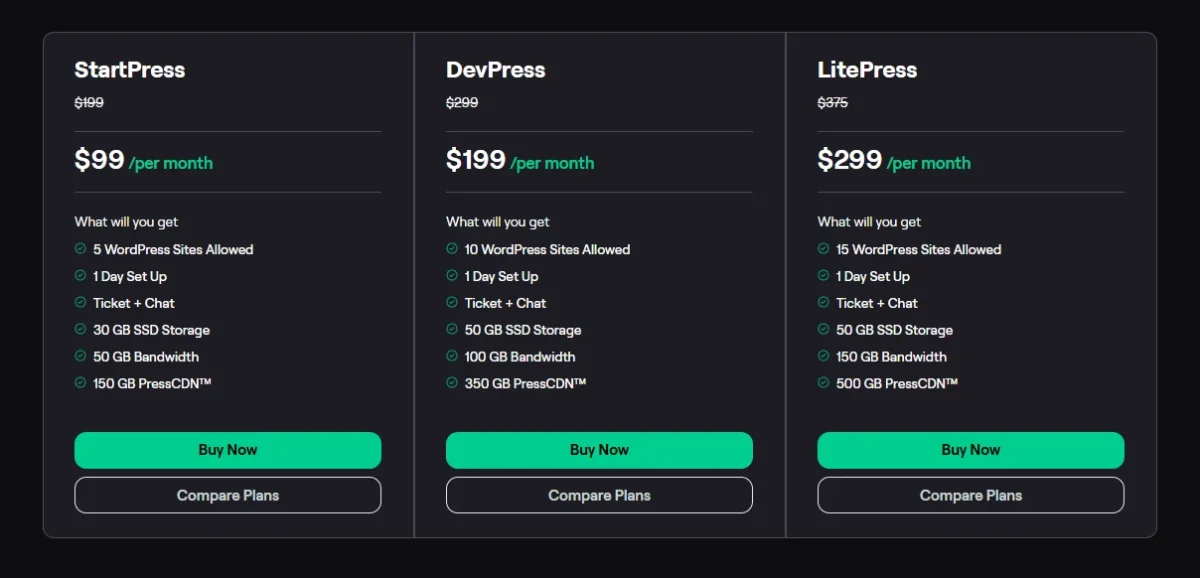
These are Pagely’s entry-level VBurst plans, designed for smaller sites that still benefit from smart page caching.
| Plan | Monthly Price | Annual Price | Sites | RAM | Best For |
| VBurst-1 | $199/mo | ~$2,268/yr | 5 | Shared | Small sites with caching |
| VBurst-2 | $299/mo | ~$3,408/yr | 10 | Shared | Moderate traffic sites |
Note: VBurst plans run on a shared cluster with burst capabilities. They’re ideal for sites that rely heavily on page caching to handle traffic.
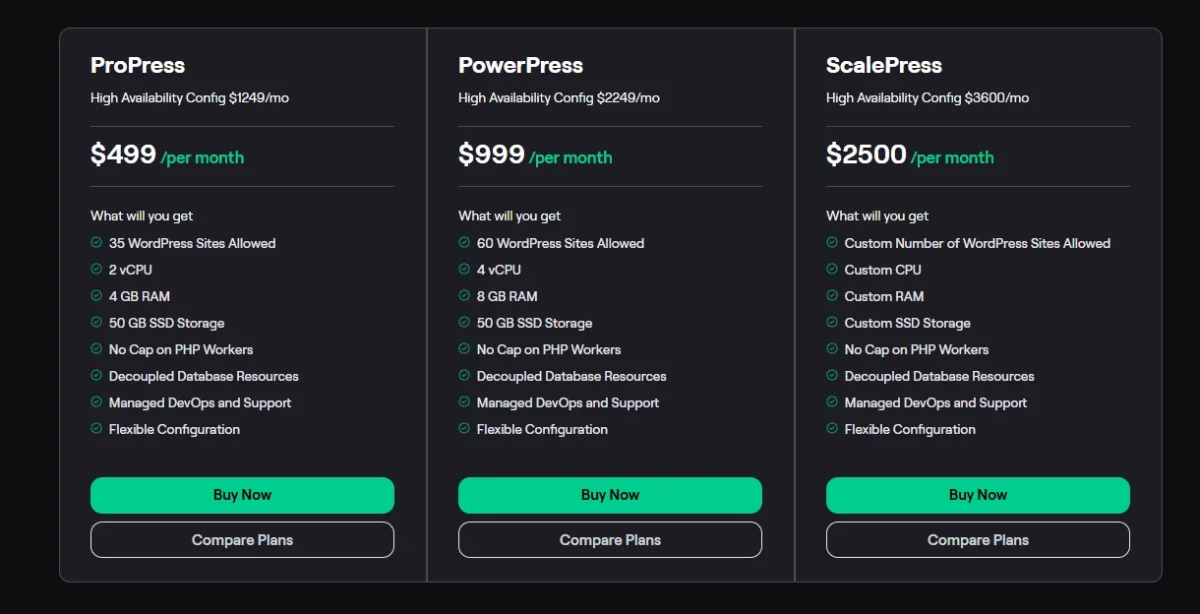
Pagely WordPress Hosting Solutions for Enterprise – Pricing Table
These are Pagely’s true VPS and High Availability plans, built for serious WordPress operations.
| Plan | Monthly Price | Annual Price | Sites | Configuration |
| VPS-1 | $499/mo | ~$5,688/yr | 35 | Amazon c5.large, 3.75GB RAM |
| VPS-2 | $999/mo | ~$11,388/yr | 60 | Amazon c5.xlarge, 2x RAM/CPU |
| VPS-1+ [HA] | $1,249/mo | $14,239/yr | 35 | Load-balanced pair, dual availability zones |
| VPS-2+ [HA] | $2,249/mo | $25,639/yr | 60 | High Availability, 2x resources |
| Enterprise | From $2,500/mo | From $28,500/yr | Custom | 6 pre-configured enterprise tiers |
| PULSAR™ | Custom | Custom | Custom | Pagely’s most powerful offering |
Note: Enterprise plans include High Availability, Disaster Recovery, custom legal terms, and access to AWS services like ElasticSearch and ElasticCache. Contact Pagely’s sales team for custom cluster pricing.
Pagely WordPress Hosting Development Plans – Pricing Table
Pagely offers Developer plans tailored for staging environments and low-traffic development workloads.
| Plan | Best For | Key Features |
| Developer 1 | Staging and dev environments | Isolated VPS, SSH, WP-CLI, Git |
| Developer 2 | CPU-intensive dev workloads | More resources, staging + production use |
Note: Developer plans are not recommended for high-traffic production sites. For production, Pagely recommends the Performance-tier plans. Exact Developer plan pricing requires contacting Pagely directly, as it varies based on configuration.
Powered by Amazon
Every Pagely site runs on Amazon Web Services — and that’s not just a marketing line. AWS gives Pagely access to global availability zones, meaning your site can be provisioned closer to your actual audience for faster response times.
On top of that, Amazon CloudFront CDN is included, which caches your content at edge locations worldwide.
The real game-changer, though, is auto-scaling. Most managed WordPress hosts give you a fixed box of resources. When traffic spikes — say, from a product launch or a viral post — your site can buckle under pressure.
Pagely’s AWS foundation means your resources expand automatically to handle the load, then scale back down when things quiet down. That kind of elastic infrastructure is rare at this price point and nearly impossible to replicate with shared or standard VPS hosting.
The Ability to Customize Your Plan
One of the more underrated features Pagely offers is plan flexibility. You’re not forced to pick from a rigid menu and overpay for resources you don’t need.
Pagely lets you customize your configuration — adjusting storage, data center location, additional nodes, and even CDN allotment — so your plan actually fits your workload.
For example, you can add up to four dedicated IP addresses at $5 per IP per month on any VPS plan. You can also choose from Tier 1 data centers (included in standard pricing) or Tier 2 locations at an additional monthly fee based on the specific region and plan.
This level of granularity is something you simply don’t get with most managed WordPress providers, and it’s especially valuable for agencies running diverse client portfolios.
The Pagely Promise – 100 Percent Uptime
Pagely promises 100% uptime — and backs it up with a real Service Level Agreement. If downtime ever occurs that’s within their control, they provide hosting credit. That’s a serious commitment, and given that their entire infrastructure runs on AWS, it’s one they can actually stand behind.
In practice, real users on G2 report that after years of using the platform, they’ve experienced virtually no meaningful downtime. One reviewer described it as having “an on-call DevOps team” that keeps everything running smoothly.
For mission-critical sites where even an hour of downtime translates to lost revenue, this kind of reliability isn’t a nice-to-have — it’s non-negotiable.
Automatic Backups
Pagely backs up your entire site and database every single day. These backups are stored securely on Amazon S3 and retained for up to 14 days, giving you a solid window to roll back if something goes wrong.
You can also push backups to your own S3 bucket, which is a smart option for businesses with their own cloud storage setup.
What makes this even more useful is the point-in-time restore capability. You’re not stuck restoring from the previous night’s snapshot only — you can pinpoint a specific moment and recover from there.
For eCommerce stores built on WooCommerce, where orders and customer data change by the minute, this level of backup granularity can be a genuine lifesaver.
WordPress Support
Pagely’s support team isn’t made up of generalists reading from a script — they’re actual WordPress engineers. They understand plugin conflicts, caching configurations, database optimization, and server-level performance issues at a deep technical level. That’s a meaningful difference from standard hosting support.
On higher-tier plans, you get access to a dedicated Slack channel for direct, real-time communication with the team. On all plans, there’s 24/7 ticket-based support, and Pagely claims they respond to roughly 79% of tickets within one hour.
Their customer happiness rating over six months sits at 99.3%, which is hard to argue with. The support model scales with your plan — the more you pay, the more direct and prioritized your access becomes.
Unlimited Page Views/Visitors
Some managed WordPress hosts will cap the number of monthly visitors your plan allows. Exceed the limit, and you’re looking at overage fees, throttling, or forced upgrades. Pagely doesn’t do that. There’s no visitor cap or pageview ceiling on any of their plans.
They put it plainly: why would anyone pay for that? It’s a fair point. For high-traffic editorial sites, busy WooCommerce stores, or membership platforms with fluctuating concurrent users, this policy removes one major source of unpredictability from your monthly bill. You scale your server resources as needed — not your visitor count.
How Easy Is Pagely to Use?
Pagely uses its own dashboard called Atomic, not the traditional cPanel you might be used to.
At first, that sounds like a drawback — but in reality, Atomic is purpose-built for WordPress management. From there, you can manage your installations, monitor performance, push to staging, and view your resource usage in real time.
The learning curve is real if you’re coming from a shared hosting background. But if you’re the kind of user Pagely is built for — a developer, an agency, or a technical team — the dashboard feels clean and logical. The staging environment is particularly well-implemented.
You can clone your live site, test updates or plugin changes, and push them live when you’re ready. It’s the kind of workflow that prevents headaches before they start.
How Much Does Pagely Cost?
Pagely sits firmly in the premium tier of managed WordPress hosting. Plans start at $199/month for the VBurst-1 entry plan and scale all the way to $2,249/month for the VPS-2+ High Availability plan, with enterprise and PULSAR™ tiers going even higher.
Annual pricing saves you a meaningful amount — for example, the VPS-1+ [HA] drops to $14,239/year compared to $1,249/month billed monthly.
There’s no introductory pricing or promotional discount — what you see is what you pay from day one. And unlike many hosts, Pagely doesn’t publish renewal rate surprises. The price you agree to is the price you continue paying.
Dedicated IP addresses cost an extra $5/IP/month on VPS plans. SSL certificates are included across all plans, but domain registration costs extra since Pagely doesn’t offer that service.
For small blogs or personal sites, the pricing is genuinely too steep. But for businesses where the cost of downtime or a security breach far exceeds the monthly hosting fee, the math starts to look very different.
How Good Is Pagely Customer Support?
Support quality is one of Pagely’s biggest selling points — and it’s consistently what real users rave about. The team is made up of WordPress engineers, not general-purpose helpdesk agents, which means when you describe a technical problem, they actually understand it.
On G2, reviewers repeatedly describe the support experience as having a dedicated DevOps team on call.
The Pagely Review that stands out most from real users is almost always about support. One long-term customer noted they’d been with Pagely for over five years and the support team had never failed them — including helping fix issues the customer caused themselves.
Response times are fast, the 99.3% customer happiness rating is verified, and for enterprise plans, the dedicated Slack channel makes communication feel immediate rather than transactional.
No cPanel
Pagely doesn’t offer cPanel, and they’re upfront about it. Instead, you manage everything through the Atomic dashboard, which is built specifically around WordPress workflows. For most Pagely users — developers, agencies, technical teams — this isn’t a problem at all.
That said, if you’ve built your entire workflow around cPanel and aren’t ready to adapt, that friction is worth acknowledging before you commit. Atomic is capable and well-designed, but it’s a different environment. Give yourself a short adjustment period, and most users find it just as functional.
No Trial Period or Money Back Guarantee
This is one of the most legitimate criticisms of Pagely. There’s no free trial, and there’s no standard money-back guarantee. You pay from day one, which asks you to commit serious money without being able to test the platform first.
The workaround Pagely offers is a pre-sales consultation with their technical team. That can help clarify whether the platform fits your needs — but it’s not the same as hands-on experience with real workloads. For high-budget decisions like this, that missing safety net is a real risk that potential customers should factor in carefully.
Inability to Purchase a Domain
Pagely is a WordPress management service, not a full-stack hosting company. Domain registration simply isn’t part of their offering. You’ll need to bring your own domain — registered through a separate registrar like Namecheap, Google Domains, or Cloudflare — and point it to Pagely.
Honestly, for the kind of business Pagely serves, this is rarely a problem. Enterprise clients and agencies already have domain management workflows in place. But if you’re newer to the process, it adds one extra step to your setup that’s worth planning for in advance.
How Does Pagely Match Up to the Competition?
| Feature | Pagely | WP Engine | Kinsta | Cloudways |
| Infrastructure | AWS (dedicated) | Multiple providers | Google Cloud | AWS, GCP, DO, Vultr |
| Starting Price | $199/mo | ~$25/mo | ~$35/mo | ~$14/mo |
| Uptime Guarantee | 100% SLA | 99.95% | 99.9% | 99.99% |
| Caching | PressCACHE | EverCache | Kinsta Cache | Breeze/custom |
| Free Trial | ❌ | ✅ (60-day guarantee) | ✅ (30-day guarantee) | ✅ (3-day trial) |
| Live Chat | VPS plans only | ✅ All plans | ✅ All plans | ✅ All plans |
| Auto-scaling | ✅ | ✅ | ✅ | ✅ |
| Visitor Caps | None | ✅ (plan-based) | ✅ (plan-based) | None |
| Best For | Enterprise/Agencies | SMBs to Enterprise | Developers/SMBs | Budget-conscious devs |
Pagely wins on infrastructure depth and support quality. WP Engine and Kinsta offer better entry-level value and more accessible pricing for smaller teams.
Cloudways is more flexible and budget-friendly, but requires more hands-on management. If cost is your primary concern, Pagely isn’t the answer. If reliability, security, and support are what keep you up at night, it’s one of the best options available.
Who Should Use Pagely
Pagely is built for a very specific kind of customer — and for that customer, it’s genuinely outstanding. If you’re running a high-traffic WordPress site where downtime means lost revenue, Pagely’s 100% uptime SLA and AWS infrastructure make a compelling case. Think media publishers, eCommerce brands, SaaS businesses, and large editorial platforms.
Digital agencies managing multiple client sites will also find a lot to love here. Isolated containers mean one client’s site problem can’t affect another’s. Staging environments, Git support, SSH access, and WP-CLI make it developer-friendly.
WooCommerce store owners processing real transactions will appreciate the PCI DSS compliance and the daily automated backups. If you need enterprise WordPress hosting and have the budget to match, Pagely belongs on your shortlist.
Who Should Not Use Pagely
If you’re just starting with WordPress, Pagely is probably not where you should begin. The pricing alone puts it out of reach for most personal bloggers, freelancers, and small business owners. You’d be paying enterprise rates for needs that a $30/month plan on Kinsta or SiteGround could comfortably handle.
The lack of a trial period or money-back guarantee also makes it a tough sell for anyone who isn’t already certain they need enterprise-grade infrastructure.
If you don’t have a technical team in place — or at least some comfort with server-level concepts — the Atomic dashboard and developer-focused toolset may feel overwhelming at first. Start somewhere more accessible, build your traffic, and consider Pagely when scale and uptime become genuine business priorities.
Conclusion
Pagely isn’t for everyone — and it’s not trying to be. It’s a premium, enterprise-grade managed WordPress platform that delivers exactly what it promises: rock-solid infrastructure powered by AWS, outstanding WordPress-specific support, and a security setup that enterprise clients can trust.
The headline from this Pagely Review is simple — you really do get what you pay for.
If your WordPress site is mission-critical and the cost of downtime or a security breach outweighs the monthly fee, Pagely makes a very strong case for itself.
But if you’re on a tight budget, just getting started, or running a low-traffic site, the entry price alone makes it a poor fit. Know your needs, match them honestly to what Pagely offers, and you’ll make the right call.
FAQs
Is Pagely worth the price?
For enterprise-level sites where downtime and security are business-critical, yes — Pagely’s AWS infrastructure, 100% uptime SLA, and expert WordPress support justify the premium pricing. For small or personal sites, there are far more affordable options.
What infrastructure does Pagely use?
Pagely runs entirely on Amazon Web Services (AWS), including CloudFront CDN for global content delivery, RDS for managed databases, and auto-scaling resources that adjust to traffic demands in real time.
Does Pagely offer a free trial or money-back guarantee?
No. Pagely doesn’t offer a free trial or a standard money-back guarantee. They do offer pre-sales consultations with their technical team to help you evaluate fit before committing.
What is PressCACHE and how does it help?
PressCACHE is Pagely’s proprietary full-page caching system. It works alongside NGINX and Varnish to dramatically reduce time-to-first-byte and improve page load speed, especially under high-traffic conditions.
Does Pagely support WooCommerce hosting?
Yes. Pagely is well-suited for WooCommerce stores. It offers PCI DSS compliance, isolated containers, automatic daily backups with point-in-time restore, and auto-scaling — all features that matter for eCommerce operations.
How does Pagely compare to WP Engine and Kinsta?
Pagely offers deeper AWS integration and stronger enterprise-level support than both. However, WP Engine and Kinsta both offer lower starting prices, free trials, and live chat on all plans — making them better choices for smaller budgets and less complex needs.
Can I register a domain through Pagely?
No. Pagely doesn’t offer domain registration. You’ll need to purchase and manage your domain through a separate registrar, then point it to your Pagely hosting environment.
Related Posts
- Best cheap web hosting: top picks from $1.00 to $2.95
- The Best Web Hosting: 25 Tested, 13 Recommended
- ChemiCloud Review: Is It Worth It? (Real Tests Inside)
- HostGator Review
- Templ Hosting Review
- Easywp Review
- Closte Review
- Mochahost Review
- Tested Hostpapa Review
- Web Hosting Review

Alex Bryant is the founder of PvyEmpire.com and a WordPress specialist with over 4 years of hands-on experience in web hosting, performance optimization, and website management. He has extensively tested top hosting providers by setting up real websites and monitoring their speed, uptime, and reliability.
At PvyEmpire.com, Alex publishes honest, data-driven reviews, detailed guides, and verified coupons & deals. His goal is to help website owners choose the right hosting, improve performance, and grow their online presence with confidence—based on real testing, not promotions.